Showing posts with label maven. Show all posts

Tuesday, September 1, 2015

Using Profiles in Maven

One of Maven's many advantages is the ability to configure automated deployments.

 By configuring the Maven POM, we can set a Web Archive (WAR) deployments to a given JEE Server (e.g. Tomcat, Liberty Core, etc).

Most projects involving more than one developer have some concept of a deployment path. A deployment artifact is likely deployed on a local web server (DEV), then deployed on an integration server (INT), and promoted to a test server (QA) if a smoke test passes.

We can configure each environment in the deployment path within our POM file.

Typically, the POM file for a Tomcat deployment would contain a section that looks something like this:
<plugin>  
     <groupId>org.apache.tomcat.maven</groupId>  
     <artifactId>tomcat7-maven-plugin</artifactId>  
     <version>2.2</version>  
     <configuration>  
          <url>http://localhost:8080/manager/text</url>  
          <server>TomcatServer</server>  
          <path>/test</path>  
          <username>craig</username>  
          <password>password</password>  
     </configuration>  
</plugin>  

And the WAR artifact is deployed using this command:
$ mvn tomcat7:deploy

This works great until we need to manage multiple environments.

Rather than maintaining multiple <configuration> sections, and commenting out the current one that is not in use, we can do something like this:
<project xmlns="http://maven.apache.org/POM/4.0.0" xmlns:xsi="http://www.w3.org/2001/XMLSchema-instance" xsi:schemaLocation="http://maven.apache.org/POM/4.0.0 http://maven.apache.org/xsd/maven-4.0.0.xsd">
 <modelVersion>4.0.0</modelVersion>

 <groupId>com.myproject</groupId>
 <artifactId>myproject</artifactId>
 <version>1.0.0</version>
 <packaging>war</packaging>

 <url />
 <name>My Project</name>
 <inceptionYear>2015</inceptionYear>
 <description>A Description Here</description>

 <build>
  <plugins>

   <plugin>
    <groupId>org.apache.maven.plugins</groupId>
    <artifactId>maven-compiler-plugin</artifactId>
    <version>2.5.1</version>
    <inherited>true</inherited>
    <configuration>
     <source>1.7</source>
     <target>1.7</target>
    </configuration>
   </plugin>

   <plugin>
    <artifactId>maven-war-plugin</artifactId>
    <version>2.4</version>
    <configuration>
     <warSourceDirectory>WebContent</warSourceDirectory>
     <failOnMissingWebXml>false</failOnMissingWebXml>
    </configuration>
   </plugin>

   <plugin>
          <artifactId>maven-war-plugin</artifactId>
         <configuration>
           <webResources>
                   <resource>
                <!-- this is relative to the pom.xml directory -->
                 <directory>../preDeploy</directory>
                  </resource>
           </webResources>
          </configuration>
    </plugin> 

   <!-- Required for Maven-to-Tomcat Deployments -->
   <plugin>
    <groupId>org.apache.tomcat.maven</groupId>
    <artifactId>tomcat7-maven-plugin</artifactId>
    <version>2.2</version>
    <configuration>      
     <path>/mypath</path>
     <url>${deploy_url}</url>
     <server>${deploy_server}</server> 
     <username>${deploy_username}</username> 
     <password>${deploy_password}</password>
    </configuration>
   </plugin>

  </plugins>
 </build>

 <!-- Build with -P<profileName> to activate one of the profiles-->
 <profiles>
  <profile>
   <id>local</id>
   <activation>
    <activeByDefault>true</activeByDefault>
   </activation>
   <properties>
    <deploy_url>http://192.168.1.200:8080/manager/text</deploy_url>
    <deploy_server>TomcatServer</deploy_server>
    <deploy_username>craig</deploy_username>
    <deploy_password>tomcat</deploy_password>
   </properties>
   <build>
    <resources>
     <resource>
      <directory>src/main/resources/local</directory>
     </resource>
    </resources>
   </build>
  </profile>
  <profile>
   <id>int</id>
   <activation>
    <activeByDefault>true</activeByDefault>
   </activation>
   <properties>
    <deploy_url>http://192.168.1.200:8081/manager/text</deploy_url>
    <deploy_server>TomcatServer</deploy_server>
    <deploy_username>craig</deploy_username>
    <deploy_password>password</deploy_password>
   </properties>
   <build>
    <resources>
     <resource>
      <directory>src/main/resources/local</directory>
     </resource>
    </resources>
   </build>
  </profile>
  <profile>
   <id>qa</id>
   <activation>
    <activeByDefault>true</activeByDefault>
   </activation>
   <properties>
    <deploy_url>http://192.168.1.200:8082/manager/text</deploy_url>
    <deploy_server>TomcatServer</deploy_server>
    <deploy_username>craig</deploy_username>
    <deploy_password>tomcat</deploy_password>
   </properties>
   <build>
    <resources>
     <resource>
      <directory>src/main/resources/local</directory>
     </resource>
    </resources>
   </build>
  </profile>
 </profiles>

 <repositories>
  <repository>
   <id>maven2-repository.java.net</id>
   <name>Java.net Repository for Maven</name>
   <url>http://download.java.net/maven/2/</url>
   <layout>default</layout>
  </repository>
 </repositories>

 <dependencies>
  <!-- 
   dependencies are listed here 
  -->
 </dependencies>

</project>
I've included the entire POM for reference.  The relevant section is under the <profiles /> element.

And the WAR artifact is deployed using this command:
$ mvn tomcat7:deploy -Pdev

The text highlighted in red above corresponds to the profile name that we have defined in the POM.


References

  1. [Blogger] Build Automation with Tomcat and Maven
    1. other articles on Maven

Thursday, April 30, 2015

How to load a resource from WEB-INF directory of a Web Archive (WAR)

The Maven Convention


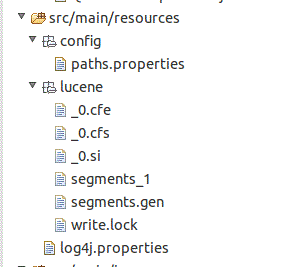
Anything that is placed within the "src/main/resources" folder will be accessible from the classpath. In the case of a web application (deployed WAR), the content will will be generated into the "WEB-INF/classes" section of the WAR file.

In this case, I have a lucene directory copied here:
Fig 1: View from within Eclipse
The JAX-RS class looks like this:

package com.mycompany;

import java.io.File;

import javax.servlet.ServletContext;
import javax.ws.rs.DefaultValue;
import javax.ws.rs.GET;
import javax.ws.rs.POST;
import javax.ws.rs.Path;
import javax.ws.rs.Produces;
import javax.ws.rs.QueryParam;
import javax.ws.rs.core.MediaType;


@Path("/path")
public class MyREST {

 @javax.ws.rs.core.Context
 ServletContext    context;

 @GET
 @Path("/get")
 @Produces(MediaType.APPLICATION_JSON)
 public Object getit(@@QueryParam("text") String text) {
  
  String fullPath = context.getRealPath("/WEB-INF/classes/lucene");
  logger.info("Acquired Lucene Path from Context (path = %s, exists = %s)", fullPath, new File(fullPath).exists());

  // perform the query logic ...
  // return the JSON result
 }
}


Note the use of the ServletContext to access the resource.

The generated WAR file looks like this:
Fig 2: Maven-generated WAR file
The WAR file was generated using Maven.


References

  1. [StackOverflow] Files under src/main/resources go into WEB-INF/classes
  2. [StackOverflow] Additional configuration for the Maven POM
    1. You can specify directories and files relative to the POM that should also be copied into the WEB-INF/classes directory.

Monday, February 2, 2015

Installing Maven on Ubuntu

There is very little purpose in attempting to download and install binaries as complex, as say Hadoop, without using a tool like Maven.

Maven includes dependency management, such that any direct and indirect dependencies to the primary JAR files will be automatically downloaded and any conflicts resolved. This article covers the basics of downloading and installing Maven.


Where do I download Maven?


I have downloaded the latest version of Apache Maven from
http://maven.apache.org/download.cgi
At the time of this article, I’m going to download Maven 3.2.3.

I prefer not to use apt to install maven. The package manager will attempt to download OpenJDK and run this in combination with Maven. Probably nothing wrong with this approach, but I don't prefer it.


Where should I install Maven?


If you are not familiar with the Linux directory layout, this article is recommended:
http://www.nixtutor.com/linux/understanding-the-linux-directory-layout/
Apache Maven should be installed in the “usr” directory. This directory houses all the binaries, documentation, libraries, and header files for all the user applications. Most user binaries will be installed into this folder making this one of the largest folders in the Linux directory.

My preferred path is:
/usr/lib/apache/maven/3.2.3/ 
This leaves opportunty to distinguish between various apache binaries and maven versions. How do I install Maven? Typically, the file will be downloaded to your “downloads” folder in your home directory.

Using a terminal, following these steps:

Create the Directory Path:
$ sudo mkdir -p /usr/lib/apache/maven/3.2.5/
This creates the directory path for the new installation. The -p flag creates the directory hierarchy. You will need to run this command as the super user (su + do = sudo).

Move the File:
$ sudo mv ~/Downloads/apache-maven-3.2.5-bin.tar.gz /usr/lib/apache/maven/3.2.5/  
Moves the downloaded file to the installation path.

Unzip the File:
$ cd /usr/lib/apache/maven/3.2.5/  
$ sudo tar -zxvf apache-maven-3.2.5-bin.tar.gz  
Navigates to the newly created folder, and unpacks the downloaded file.


Setting the PATH


I recommend setting the path in the /etc/environment file. This file is specifically meant for system-wide environment variable settings. It is not a script file, but rather consists of assignment expressions, one per line.
$ sudo gedit /etc/environment

and once completed, I have this:
1
2
3
4
PATH="/usr/local/sbin:/usr/local/bin:/usr/sbin:/usr/bin:/sbin:/bin:/usr/games:/usr/local/games:/usr/lib/jvm/jdk/jdk1.8.0_25/bin/:/usr/lib/apache/maven/3.2.3/bin"  
export PATH  
export JAVA_HOME=/usr/lib/jvm/jdk/jdk1.8.0_25  
export MAVEN_HOME=/usr/lib/apache/maven/3.2.5

To activate these path variables for the current terminal session, type
$ source /etc/environment 

If your path variables were set successfully, you should be able to type
$ mvn –ver

in the terminal window and get back something that looks like this:
$ mvn -ver
Apache Maven 3.2.5 (12a6b3acb947671f09b81f49094c53f426d8cea1; 2014-12-14T09:29:23-08:00)  
Maven home: /usr/lib/apache/maven/3.2.5  
Java version: 1.8.0_31, vendor: Oracle Corporation  
Java home: /usr/lib/jvm/jdk/1.8.0_31/jre  
Default locale: en_US, platform encoding: UTF-8  
OS name: "linux", version: "3.16.0-23-generic", arch: "amd64", family: "unix"  


Script Automation


This entire process can be automated in a single shell script:
install_maven() {
    if hash mvn 2>/dev/null; 
        then
        echo "Maven is already Installed"
        mvn --version | grep "Apache Maven"
    else
        #   provision the classpath
        sudo sh -c 'echo "export MAVEN_HOME=/usr/lib/apache/maven/3.2.5" >> /etc/environment'
        sudo sh -c 'echo "PATH=\"$PATH:/usr/lib/apache/maven/3.2.5/bin\"" >> /etc/environment'
        sudo sh -c 'echo "export PATH" >> /etc/environment'
        #   create the directories
        sudo mkdir -p $MAVEN_HOME
        #   download and extract the files
        cd $MAVEN_HOME
        sudo wget http://mirrors.koehn.com/apache/maven/maven-3/3.2.5/binaries/apache-maven-3.2.5-bin.tar.gz
        sudo tar -zxvf apache-maven-3.2.5-bin.tar.gz
        #   massage the directory structure and cleanup
        sudo rm apache-maven-3.2.5-bin.tar.gz
        sudo mv apache-maven-3.2.5/* .
        sudo rm -rf apache-maven-3.2.5/
        source /etc/environment
    fi
}


References

  1. Resources
    1. [GitHub] Installation Script
    2. [GitHub] Docker Container (extends java:8)
  2. Installing Oracle's JDK on Ubuntu
  3. Installing Eclipse on Ubuntu

Monday, December 8, 2014

Maven: Project Object Model (POM) Overview

In this tutorial, we'll look at several real-world POM files.


Simple Web POM


This POM is from the Maven Web Project Deployment Tutorial.

  <project xmlns="http://maven.apache.org/POM/4.0.0" xmlns:xsi="http://www.w3.org/2001/XMLSchema-instance"   
    xsi:schemaLocation="http://maven.apache.org/POM/4.0.0 http://maven.apache.org/xsd/maven-4.0.0.xsd">   
      <modelVersion>4.0.0</modelVersion>   
   
      <groupId>com.mycompany.web</groupId>   
      <artifactId>mycompany-web</artifactId>   
      <version>1.0.0</version>   
      <packaging>war</packaging>   
   
      <build>   
           <sourceDirectory>src</sourceDirectory>   
           <finalName>mycompany-web</finalName>   
           <plugins>  
                <plugin>  
                     <groupId>org.apache.maven.plugins</groupId>  
                     <artifactId>maven-compiler-plugin</artifactId>  
                     <version>3.2</version>  
                     <configuration>  
                          <source>1.7</source>  
                          <target>1.7</target>  
                     </configuration>  
                </plugin>  
           </plugins>  
      </build>   
   
      <properties>   
   
           <maven.compiler.source>1.7</maven.compiler.source>   
           <maven.compiler.target>1.7</maven.compiler.target>   
   
           <failOnMissingWebXml>false</failOnMissingWebXml>   
   
           <javax.version>7.0</javax.version>   
   
           <project.build.sourceEncoding>UTF-8</project.build.sourceEncoding>   
           <project.reporting.outputEncoding>UTF-8</project.reporting.outputEncoding>   
      </properties>   
   
      <dependencies>   
   
           <dependency>   
                <groupId>javax</groupId>   
                <artifactId>javaee-api</artifactId>   
                <version>${javax.version}</version>   
                <scope>provided</scope>   
           </dependency>   
   
      </dependencies>   
 </project>   


Maven Coordinates

  • groupId
  • artifactId
    • The name that the project is known by (e.g. swtk-core).
  • version
    • The version of the artifact
      • I prefer to use major and minor versioning (eg. x.y.z)
  • packaging
    • the default package is JAR
    • pom, jar, maven-plugin, ejb, war, ear, rar, par.


Optional Information

  • url
    • where the project lives (eg. github URL)
  • inceptionYear
    • helpful documentation point
  • name
    • codename (or other nickname) for the project
    • has no bearing on artifact generation
      • Useful in console output
      • For example, if I include a module in a parent POM, the output from the maven build will give this name in the output, rather than the artifactId.
  • description
    • helpful documentation point


Build Information

  • sourceDirectory
  • finalName
  • Plugins
    • Compiler Plugin
      • This is an important plugin to configure for Eclipse Integration
        • Frequently, Eclipse will become out-of-date with the Maven process and needs to be refreshed.  
        • While refreshing Maven for Eclipse is simple (ALT+F5), the Maven plugin will default the Java Compiler and Compliance levels to JDK 1.5, at the time of this writing.
        • By setting this plugin, you ensure that Maven and Eclipse will not come into conflict with Compiler and Compliance levels.

Properties

  • Compiler
  • failOnMissingWebXml
  • Encoding
  • Versions


Dependency Management


Maven has two dependency sections in the POM: Dependency Management and Dependencies.

Visually, they look like this in the Eclipse POM editor:


A dependency defined under the dependency management section can be used in child modules, without a need for the version to be defined.

This can be illustrated using jUnit:
 <dependencyManagement>  
  <dependencies>  
   <dependency>  
    <groupId>junit</groupId>  
    <artifactId>junit</artifactId>  
    <version>3.8</version>  
   </dependency>  
  </dependencies>  
 </dependencyManagement>  


In the child POM, we can simply specify
  <dependencies>  
   <dependency>  
    <groupId>junit</groupId>  
    <artifactId>junit</artifactId>  
   </dependency>  
  </dependencies>  

No version number is needed.  The version can be modified in the parent POM, and all downstream dependencies will be updated automatically.


References

  1. [Stackoverflow] Dependecy vs Dependency Management Section in Maven

Wednesday, December 3, 2014

Maven: Installing a Local JAR

What do I do when I have a 3rd party JAR that doesn't support Maven?

Maven tries to promote the notion of a user local repository where JARs, or any project artifacts, can be stored and used for any number of builds. Many projects have dependencies such as XML parsers and standard utilities that are often replicated in typical builds. Referencing a JAR outside the repository breaks this paradigm.

Frequently, you will have 3rd party JARs that you need to put in your local repository for use in your builds, since they don't exist in any public repository like Maven Central. By placing the JAR in our local repository, we create a default POM file, and can use this as the reference point in our own application.

Maven provides a goal to make the plugin installation easier and less error prone.


JAWS!


I want to use the Java API for WordNet Searching (JAWS).  This is not a Maven project. So we're going to have to install this JAR file locally to use it properly.

 I could reference this in my POM like this:
 <dependency>  
      <groupId>jaws</groupId>  
      <artifactId>jaws</artifactId>  
      <version>${jaws.version}</version>  
      <scope>system</scope>  
      <systemPath>${basedir}/../dependencies/jaws/1.2/jaws-bin.jar</systemPath>  
 </dependency>  

But then Maven will give me a warning
 $ mvn clean package  
 [INFO] Scanning for projects...  
 [WARNING]  
 [WARNING] Some problems were encountered while building the effective model for edu.smu.tspell.wordnet:edu.smu.tspell.wordnet:jar:0.0.1-SNAPSHOT  
 [WARNING] 'dependencies.dependency.systemPath' for jaws:jaws:jar should not point at files within the project directory, ${basedir}/../dependencies/jaws/1.2/jaws-bin.jar will be unresolvable by dependent projects @ line 53, column 14  
 [WARNING]  
 [WARNING] It is highly recommended to fix these problems because they threaten the stability of your build.  
 [WARNING]  
 [WARNING] For this reason, future Maven versions might no longer support building such malformed projects.  
 [WARNING]  
and subsequent POMs that use this POM will also include warnings.


Local Installation


Fortunately, performing the local installation of this JAR is not difficult.

The downside it hat every developer on my team will have to do this. Bear in mind, if there are multiple JARs to be installed locally, we could always script this. As provisioning requirements go, this doesn't qualify as onerous.

The installation goal is:
 mvn install:install-file -Dfile=c:\jaws-bin.jar -DgroupId=jaws -DartifactId=jaws -Dversion=1.2 -Dpackaging=jar  

My operational output is
 $ mvn install:install-file -Dfile=c:\jaws-bin.jar -DgroupId=jaws -DartifactId=jaws -Dversion=1.2 -Dpackaging=jar  
 [INFO] Scanning for projects...  
 [INFO]  
 [INFO] ------------------------------------------------------------------------  
 [INFO] Building edu.smu.tspell.wordnet 0.0.1-SNAPSHOT  
 [INFO] ------------------------------------------------------------------------  
 [INFO]  
 [INFO] --- maven-install-plugin:2.4:install-file (default-cli) @ edu.smu.tspell.wordnet ---  
 [INFO] Installing c:\jaws-bin.jar to C:\Users\Craig Trim\.m2\repository\jaws\jaws\1.2\jaws-1.2.jar  
 [INFO] ------------------------------------------------------------------------  
 [INFO] BUILD SUCCESS  
 [INFO] ------------------------------------------------------------------------  
 [INFO] Total time: 1.233 s  
 [INFO] Finished at: 2014-12-03T08:58:42-08:00  
 [INFO] Final Memory: 17M/981M  
 [INFO] ------------------------------------------------------------------------  

Notice the repository location that the JAR was installed to:
C:\Users\Craig Trim\.m2\repository\jaws\jaws\1.2\jaws-1.2.jar
If I pull up that repository location, I notice that POM has been generated for me:
jaws-1.2.pom


The Generated POM


The Install Plugin has created a generic POM.

In this case the POM contains the minimal set of elements required by Maven: groupId, artifactId, version and packaging:
 <?xml version="1.0" encoding="UTF-8"?>  
 <project xsi:schemaLocation="http://maven.apache.org/POM/4.0.0 http://maven.apache.org/xsd/maven-4.0.0.xsd" xmlns="http://maven.apache.org/POM/4.0.0"  
   xmlns:xsi="http://www.w3.org/2001/XMLSchema-instance">  
  <modelVersion>4.0.0</modelVersion>  
  <groupId>jaws</groupId>  
  <artifactId>jaws</artifactId>  
  <version>1.2</version>  
  <description>POM was created from install:install-file</description>  
 </project>  


POM Relationships


And from here, I pull out the groupId, artifactId and version into my own POM:
 <properties>  
      ...  
      <jaws.version>1.2</jaws.version>  
      ...  
 </properties>  
 <dependencies>  
      ...  
      <dependency>  
           <groupId>jaws</groupId>  
           <artifactId>jaws</artifactId>  
           <version>${jaws.version}</version>  
      </dependency>  
      ...  
 </dependencies>  


Running the Full Install


Now I'm going to run the full install goal
mvn clean install
And in my operational output there are no warnings:
 $ mvn clean install  
 [INFO] Scanning for projects...  
 [INFO]  
 [INFO] ------------------------------------------------------------------------  
 [INFO] Building edu.smu.tspell.wordnet 0.0.1-SNAPSHOT  
 [INFO] ------------------------------------------------------------------------  
 [INFO]  
 [INFO] --- maven-clean-plugin:2.5:clean (default-clean) @ edu.smu.tspell.wordnet ---  
 [INFO] Deleting \projects\edu.smu.tspell.wordnet\target  
 [INFO]  
 [INFO] --- maven-resources-plugin:2.6:resources (default-resources) @ edu.smu.tspell.wordnet ---  
 [INFO] Using 'UTF-8' encoding to copy filtered resources.  
 [INFO] skip non existing resourceDirectory \projects\edu.smu.tspell.wordnet\src\main\resources  
 [INFO]  
 [INFO] --- maven-compiler-plugin:3.1:compile (default-compile) @ edu.smu.tspell.wordnet ---  
 [INFO] Changes detected - recompiling the module!  
 [INFO] Compiling 10 source files to \projects\edu.smu.tspell.wordnet\target\classes  
 [INFO]  
 [INFO] --- maven-resources-plugin:2.6:testResources (default-testResources) @ edu.smu.tspell.wordnet ---  
 [INFO] Using 'UTF-8' encoding to copy filtered resources.  
 [INFO] skip non existing resourceDirectory \projects\edu.smu.tspell.wordnet\src\test\resources  
 [INFO]  
 [INFO] --- maven-compiler-plugin:3.1:testCompile (default-testCompile) @ edu.smu.tspell.wordnet ---  
 [INFO] No sources to compile  
 [INFO]  
 [INFO] --- maven-surefire-plugin:2.12.4:test (default-test) @ edu.smu.tspell.wordnet ---  
 [INFO] No tests to run.  
 [INFO]  
 [INFO] --- maven-jar-plugin:2.4:jar (default-jar) @ edu.smu.tspell.wordnet ---  
 [INFO] Building jar: \projects\edu.smu.tspell.wordnet\target\edu.smu.tspell.wordnet-0.0.1-SNAPSHOT.jar  
 [INFO]  
 [INFO] --- maven-install-plugin:2.4:install (default-install) @ edu.smu.tspell.wordnet ---  
 [INFO] Installing \projects\edu.smu.tspell.wordnet\target\edu.smu.tspell.wordnet-0.0.1-SNAPSHOT.jar to C:\Users\Craig Trim\.m2\repository\edu\smu\tspell\wordnet\edu.smu.tspell.wordnet\0.0.1-SNAPSHOT\edu.smu.tspell.wordnet-0.0.1-SNAPSHOT.jar  
 [INFO] Installing \projects\edu.smu.tspell.wordnet\pom.xml to C:\Users\Craig Trim\.m2\repository\edu\smu\tspell\wordnet\edu.smu.tspell.wordnet\0.0.1-SNAPSHOT\edu.smu.tspell.wordnet-0.0.1-SNAPSHOT.pom  
 [INFO] ------------------------------------------------------------------------  
 [INFO] BUILD SUCCESS  
 [INFO] ------------------------------------------------------------------------  
 [INFO] Total time: 2.511 s  
 [INFO] Finished at: 2014-12-03T09:01:21-08:00  
 [INFO] Final Memory: 25M/981M  
 [INFO] ------------------------------------------------------------------------  


With Jenkins


I've been struggling with this, and apparently I'm not the only one:

  1. [Stackoverflow] Jenkins can't find local Maven dependencies
    1. looks like this was a permissions issue
  1. [Stackoverflow] Managing third party JAR dependencies with Eclipse, Maven and Jenkins
    1. Recommends either Nexus from Sonatype
    2. Or using systemPath (highly discouraged)
  1. [Jenkins Bug Report] Unable to find manually installed Maven artifacts
    1. There does not appear to any official fixes (only workarounds)

I ended up using this approach:

 <dependency>  
      <groupId>jaws</groupId>  
      <artifactId>jaws</artifactId>  
      <version>1.2</version>  
      <type>jar</type>  
      <scope>system</scope>  
      <systemPath>/home/craig/jaws-bin.jar</systemPath>  
 </dependency>  

which is terrible.

Note that this is only for Jenkins-CI integration.  For local building, I don't need this.  But I couldn't find any other method for Jenkins to resolve the local JAR.


References

  1. Installing an artifact to a specific repository path

Tuesday, December 2, 2014

Deploy a Web Project with Maven (without Eclipse!)

The purpose of this tutorial is the creation of a simple JEE Web Project without using an IDE. Maven will be used to manage the builds, and Tomcat will host the Web Application.


Assumptions

  1. Maven 3.2.3 
  2. Apache Tomcat Version 7.0.57
  3. Not using an IDE such as Eclipse
  4. JDK 1.7.0_71
  5.  $ java -version  
     java version "1.7.0_71"  
     Java(TM) SE Runtime Environment (build 1.7.0_71-b14)  
     Java HotSpot(TM) 64-Bit Server VM (build 24.71-b01, mixed mode)  
    
     $ mvn -ver  
     Apache Maven 3.2.3 (33f8c3e1027c3ddde99d3cdebad2656a31e8fdf4; 2014-08-11T13:58:10-07:00)  
     Maven home: A:\Java\packages\maven\3.2.3\bin\..  
     Java version: 1.7.0_71, vendor: Oracle Corporation  
     Java home: C:\Program Files\Java\jdk1.7.0_71\jre  
     Default locale: en_US, platform encoding: Cp1252  
     OS name: "windows 7", version: "6.1", arch: "amd64", family: "windows"  
    
Everything in this tutorial should be compatible with Java 8, Tomcat 8 and Linux, but has not been tested on this environments.


Outline

  1. Create a POM for the JEE Web Project
  2. Add a Servlet
  3. Configure Tomcat
  4. Deploy to Tomcat
  5. Test the Servlet


Create a JEE Web Project using Maven


I'm going to create a workspace for my Web Project called "mywebws".  Within this workspace, I'll create the JEE Web Project.  I'll call this "myweb".  Within this folder, I'll create any empty text file called pom.xml.

So far, everything is this simple:
 Directory of A:\Java\workspaces\other\mywebws\myweb  
 12/05/2014 01:38 PM  <DIR>     .  
 12/05/2014 01:38 PM  <DIR>     ..  
 12/05/2014 01:41 PM       1,104 pom.xml  
         1 File(s)     1,104 bytes  


Update the POM


The most important file within this web project is the Maven POM file.  We're going to start by defining a bare minimum POM file.

We could run a maven archetype that will generate the required folder structure for us automatically, but in reality, this saves very little time.  If you understand the POM layout, it's just as easy to get started this way.


Simple Web POM

 <project xmlns="http://maven.apache.org/POM/4.0.0" xmlns:xsi="http://www.w3.org/2001/XMLSchema-instance"  
      xsi:schemaLocation="http://maven.apache.org/POM/4.0.0 http://maven.apache.org/xsd/maven-4.0.0.xsd">  
      <modelVersion>4.0.0</modelVersion>  
   
      <groupId>com.mycompany.simple</groupId>  
      <artifactId>simple-webapp</artifactId>  
      <version>1.0</version>  
      <packaging>war</packaging>  
   
      <build>  
           <sourceDirectory>src</sourceDirectory>  
           <finalName>simple-webapp</finalName>  
      </build>  
   
      <properties>  
   
           <maven.compiler.source>1.7</maven.compiler.source>  
           <maven.compiler.target>1.7</maven.compiler.target>  
   
           <failOnMissingWebXml>false</failOnMissingWebXml>  
   
           <javax.version>7.0</javax.version>  
   
           <project.build.sourceEncoding>UTF-8</project.build.sourceEncoding>  
           <project.reporting.outputEncoding>UTF-8</project.reporting.outputEncoding>  
      </properties>  
   
      <dependencies>  
   
           <dependency>  
                <groupId>javax</groupId>  
                <artifactId>javaee-api</artifactId>  
                <version>${javax.version}</version>  
                <scope>provided</scope>  
           </dependency>  
   
      </dependencies>  
 </project>   


I want to validate what I have so far, so I type this on the command line
mvn validate -e
and get this output:
 A:\Java\workspaces\other\mywebws\myweb>mvn validate -e  
 [INFO] Error stacktraces are turned on.  
 [INFO] Scanning for projects...  
 [INFO]  
 [INFO] ------------------------------------------------------------------------  
 [INFO] Building mycompany-web 7.0  
 [INFO] ------------------------------------------------------------------------  
 [INFO] ------------------------------------------------------------------------  
 [INFO] BUILD SUCCESS  
 [INFO] ------------------------------------------------------------------------  
 [INFO] Total time: 0.085 s  
 [INFO] Finished at: 2014-12-05T13:57:20-08:00  
 [INFO] Final Memory: 15M/981M  
 [INFO] ------------------------------------------------------------------------  

This demonstrates that the POM file is set up correctly, so far.  The Maven POM Tutorial explains each part of this file.


Adding a Servlet


I'm going to add a simple variation of the servlet defined here.

My Servlet looks like this:
  package com.mycompany.web.servlets; 
  
  import java.io.IOException;   
  import java.io.PrintWriter;   
  import javax.servlet.ServletException;   
  import javax.servlet.annotation.WebServlet;   
  import javax.servlet.http.HttpServlet;   
  import javax.servlet.http.HttpServletRequest;   
  import javax.servlet.http.HttpServletResponse;  
 
  @WebServlet(  
   description = "My Simple Servlet",   
   urlPatterns = {   
     "/HS",   
     "/myservlets/Hello.do"   
   }  
  )   

  public class HelloWorld extends HttpServlet {  
 
    private static final long   serialVersionUID   = 1L;  
 
    public HelloWorld() {   
       super();   
    }   

    protected void doGet(HttpServletRequest request, HttpServletResponse response) throws ServletException, IOException {   
       response.setContentType("text/html");   
       PrintWriter out = response.getWriter();   
       out.println("Hi There!");   
       out.close();   
    }   

    protected void doPost(HttpServletRequest request, HttpServletResponse response) throws ServletException, IOException {}   
  }   

Run the
mvn clean package -e
command once this is complete.

Successful operational output looks something like this:
 ~\mywebws\myweb>mvn clean package -e  
 [INFO] Error stacktraces are turned on.  
 [INFO] Scanning for projects...  
 [INFO]  
 [INFO] ------------------------------------------------------------------------  
 [INFO] Building mycompany-web 7.0  
 [INFO] ------------------------------------------------------------------------  
 [INFO]  
 [INFO] --- maven-clean-plugin:2.5:clean (default-clean) @ mycompany-web ---  
 [INFO] Deleting ~\mywebws\myweb\target  
 [INFO]  
 [INFO] --- maven-resources-plugin:2.6:resources (default-resources) @ mycompany-web ---  
 [INFO] Using 'UTF-8' encoding to copy filtered resources.  
 [INFO] skip non existing resourceDirectory ~\mywebws\myweb\src\main\resources  
 [INFO]  
 [INFO] --- maven-compiler-plugin:3.1:compile (default-compile) @ mycompany-web ---  
 [INFO] Changes detected - recompiling the module!  
 [INFO] Compiling 1 source file to ~\mywebws\myweb\target\classes  
 [INFO]  
 [INFO] --- maven-resources-plugin:2.6:testResources (default-testResources) @ mycompany-web ---  
 [INFO] Using 'UTF-8' encoding to copy filtered resources.  
 [INFO] skip non existing resourceDirectory ~\mywebws\myweb\src\test\resources  
 [INFO]  
 [INFO] --- maven-compiler-plugin:3.1:testCompile (default-testCompile) @ mycompany-web ---  
 [INFO] No sources to compile  
 [INFO]  
 [INFO] --- maven-surefire-plugin:2.12.4:test (default-test) @ mycompany-web ---  
 [INFO] No tests to run.  
 [INFO]  
 [INFO] --- maven-war-plugin:2.2:war (default-war) @ mycompany-web ---  
 [INFO] Packaging webapp  
 [INFO] Assembling webapp [mycompany-web] in [~\mywebws\myweb\target\mycompany-web]  
 [INFO] Processing war project  
 [INFO] Webapp assembled in [22 msecs]  
 [INFO] Building war: ~\mywebws\myweb\target\mycompany-web.war  
 [INFO] ------------------------------------------------------------------------  
 [INFO] BUILD SUCCESS  
 [INFO] ------------------------------------------------------------------------  
 [INFO] Total time: 1.487 s  
 [INFO] Finished at: 2014-12-05T14:06:40-08:00  
 [INFO] Final Memory: 26M/981M  
 [INFO] ------------------------------------------------------------------------  


Compiler Validation


It's a good idea to become familiar with the output that Maven produces.


You should have a compiled class file here:
myweb\target\classes\com\mycompany\web\servlets\HelloWorld.class
A more important directory corresponds the artifactId in the POM file, and is the JEE-compliant directory structure that will become the basis for our deployed WAR file:
mycompany-web
In this directory is the WEB-INF and META-INF folders, and eventually the WebContent folder will be generated here as well.

Configure POM for Tomcat Deployment


Now we want to configure the POM file to automatically create a WAR file and deploy to Tomcat.

This will require us to add three plugins to our POM file.
 <project xmlns="http://maven.apache.org/POM/4.0.0" xmlns:xsi="http://www.w3.org/2001/XMLSchema-instance"  
      xsi:schemaLocation="http://maven.apache.org/POM/4.0.0 http://maven.apache.org/xsd/maven-4.0.0.xsd">  
      <modelVersion>4.0.0</modelVersion>  

      <groupId>com.mycompany.web</groupId>  
      <artifactId>mycompany-web</artifactId>  
      <version>7.0</version>  
      <packaging>war</packaging>  

      <build>  
           <sourceDirectory>src</sourceDirectory>  
           <finalName>mycompany-web</finalName>  

           <plugins>  

                <plugin>  
                     <groupId>org.codehaus.mojo</groupId>  
                     <artifactId>build-helper-maven-plugin</artifactId>  
                     <version>1.7</version>  
                     <executions>  
                          <execution>  
                               <phase>generate-sources</phase>  
                               <goals>  
                                    <goal>add-source</goal>  
                               </goals>  
                               <configuration>  
                                    <sources>  
                                         <source>src</source>  
                                    </sources>  
                               </configuration>  
                          </execution>  
                     </executions>  
                </plugin>  

                <plugin>  
                     <artifactId>maven-compiler-plugin</artifactId>  
                     <version>3.1</version>  
                     <configuration>  
                          <source>1.7</source>  
                          <target>1.7</target>  
                     </configuration>  
                </plugin>  

                <plugin>  
                     <artifactId>maven-war-plugin</artifactId>  
                     <version>2.4</version>  
                     <configuration>  
                          <warSourceDirectory>WebContent</warSourceDirectory>  
                          <failOnMissingWebXml>false</failOnMissingWebXml>  
                     </configuration>  
                </plugin>  

                <plugin>  
                     <groupId>org.apache.tomcat.maven</groupId>  
                     <artifactId>tomcat7-maven-plugin</artifactId>  
                     <version>2.2</version>  
                     <configuration>  
                          <url>http://localhost:8080/manager/text</url>  
                          <server>TomcatServer</server>  
                          <path>/test</path>  
                          <username>craig</username>  
                          <password>password</password>  
                     </configuration>  
                </plugin>  

           </plugins>  
      </build>  

      <properties>  

           <maven.compiler.source>1.7</maven.compiler.source>  
           <maven.compiler.target>1.7</maven.compiler.target>  

           <failOnMissingWebXml>false</failOnMissingWebXml>  
           <javax.version>7.0</javax.version>  

           <project.build.sourceEncoding>UTF-8</project.build.sourceEncoding>  
           <project.reporting.outputEncoding>UTF-8</project.reporting.outputEncoding>  

      </properties>  

      <dependencies>  
           <dependency>  
                <groupId>javax</groupId>  
                <artifactId>javaee-api</artifactId>  
                <version>${javax.version}</version>  
                <scope>provided</scope>  
           </dependency>  
      </dependencies>  

 </project>  

After modifying the POM, it's a good idea to validate the structure using
mvn validate -e

Modify Tomcat Settings for Maven


Add a  Maven specific configuration to the TOMCAT_HOME/conf directory.

add a settings.xml file with this information
 <?xml version="1.0" encoding="UTF-8"?>  
 <settings>  
      <servers>  
           <server>  
                <id>TomcatServer</id>  
                <username>craig</username>  
                <password>password</password>  
           </server>  
      </servers>  
 </settings>  

This file is part of the maven settings and is not specific to tomcat, though the tomcat-maven-plugin uses the servers defined there


Within your Maven POM file of the Web application you are deploying
 <plugin>  
      <groupId>org.apache.tomcat.maven</groupId>  
      <artifactId>tomcat7-maven-plugin</artifactId>  
      <version>2.2</version>  
      <configuration>  
           <url>http://localhost:8080/manager/text</url>  
           <server>TomcatServer</server>  
           <path>/test</path>  
           <username>craig</username>  
           <password>password</password>  
      </configuration>  
 </plugin>  


Deploying the Servlet


Assuming our configuration is correct, we can create and deploy a WAR using a single command
mvn tomcat7:deploy

Successful operational output for me looks like this:
 A:\Java\workspaces\other\mywebws\myweb>mvn tomcat7:deploy -e  
 [INFO] Error stacktraces are turned on.  
 [INFO] Scanning for projects...  
 [INFO]  
 [INFO] ------------------------------------------------------------------------  
 [INFO] Building mycompany-web 7.0  
 [INFO] ------------------------------------------------------------------------  
 [INFO]  
 [INFO] >>> tomcat7-maven-plugin:2.2:deploy (default-cli) > package @ mycompany-web >>>  
 [INFO]  
 [INFO] --- build-helper-maven-plugin:1.7:add-source (default) @ mycompany-web ---  
 [INFO] Source directory: A:\Java\workspaces\other\mywebws\myweb\src added.  
 [INFO]  
 [INFO] --- maven-resources-plugin:2.6:resources (default-resources) @ mycompany-web ---  
 [INFO] Using 'UTF-8' encoding to copy filtered resources.  
 [INFO] skip non existing resourceDirectory A:\Java\workspaces\other\mywebws\myweb\src\main\resources  
 [INFO]  
 [INFO] --- maven-compiler-plugin:3.1:compile (default-compile) @ mycompany-web ---  
 [INFO] Changes detected - recompiling the module!  
 [INFO] Compiling 1 source file to A:\Java\workspaces\other\mywebws\myweb\target\classes  
 [INFO]  
 [INFO] --- maven-resources-plugin:2.6:testResources (default-testResources) @ mycompany-web ---  
 [INFO] Using 'UTF-8' encoding to copy filtered resources.  
 [INFO] skip non existing resourceDirectory A:\Java\workspaces\other\mywebws\myweb\src\test\resources  
 [INFO]  
 [INFO] --- maven-compiler-plugin:3.1:testCompile (default-testCompile) @ mycompany-web ---  
 [INFO] No sources to compile  
 [INFO]  
 [INFO] --- maven-surefire-plugin:2.12.4:test (default-test) @ mycompany-web ---  
 [INFO] No tests to run.  
 [INFO]  
 [INFO] --- maven-war-plugin:2.4:war (default-war) @ mycompany-web ---  
 [INFO] Packaging webapp  
 [INFO] Assembling webapp [mycompany-web] in [A:\Java\workspaces\other\mywebws\myweb\target\mycompany-web]  
 [INFO] Processing war project  
 [INFO] Copying webapp resources [A:\Java\workspaces\other\mywebws\myweb\WebContent]  
 [INFO] Webapp assembled in [23 msecs]  
 [INFO] Building war: A:\Java\workspaces\other\mywebws\myweb\target\mycompany-web.war  
 [INFO]  
 [INFO] <<< tomcat7-maven-plugin:2.2:deploy (default-cli) < package @ mycompany-web <<<  
 [INFO]  
 [INFO] --- tomcat7-maven-plugin:2.2:deploy (default-cli) @ mycompany-web ---  
 [INFO] Deploying war to http://localhost:8080/test  
 Uploading: http://localhost:8080/manager/text/deploy?path=%2Ftest  
 Uploaded: http://localhost:8080/manager/text/deploy?path=%2Ftest (4 KB at 3176.8 KB/sec)  
 [INFO] tomcatManager status code:200, ReasonPhrase:OK  
 [INFO] OK - Deployed application at context path /test  
 [INFO] ------------------------------------------------------------------------  
 [INFO] BUILD SUCCESS  
 [INFO] ------------------------------------------------------------------------  
 [INFO] Total time: 2.582 s  
 [INFO] Finished at: 2014-12-05T14:34:23-08:00  
 [INFO] Final Memory: 32M/981M  
 [INFO] ------------------------------------------------------------------------  


The web application can be undeployed by typing
mvn tomcat7:undeploy -e


Testing the Servlet


I used these annotations to define the deployment path:
  @WebServlet(  
   description = "My Simple Servlet",   
   urlPatterns = {   
     "/HS",   
     "/myservlets/Hello.do"   
   }  
  )   

and I can test in a browser by typing:
http://localhost:8080/test/myservlets/Hello.do


References

  1. Server Configuration and Deployment
    1. [Maven Documentation] Maven Server Configuration
      1. The repositories for download and deployment are defined by the repositories and distributionManagement elements of the POM. However, certain settings such as username and password should not be distributed along with the pom.xml. This type of information should exist on the build server in the settings.xml.
    2. [Java Thinking] Deploying to Tomcat 7 with Maven
      1. Short and Simple Tutorial
    3. [Stackoverflow] Settings.xml
      1. The settings.xml file is part of the maven settings and is not specific to tomcat, though the tomcat-maven-plugin uses the servers defined there.
  2. POM Editing and Conventions:
    1. [Maven Documentation] Naming Conventions
      1. Guide to naming conventions on groupId, artifactId and version.
    2. The POM Editor
      1. I prefer to use Notepad++ for XML editing.
      2. Eclipse also has a form-based POM editor.


Troubleshooting

  1. Connection Refused
     [INFO] ------------------------------------------------------------------------  
     [INFO] BUILD FAILURE  
     [INFO] ------------------------------------------------------------------------  
     [INFO] Total time: 9.099 s  
     [INFO] Finished at: 2015-01-05T12:49:10-08:00  
     [INFO] Final Memory: 14M/384M  
     [INFO] ------------------------------------------------------------------------  
     [ERROR] Failed to execute goal org.apache.tomcat.maven:tomcat7-maven-plugin:2.2:deploy (default-cli) on project sandbox-simple: Cannot invoke Tomcat manager: Connection refused: connect -> [Help 1]  
     org.apache.maven.lifecycle.LifecycleExecutionException: Failed to execute goal org.apache.tomcat.maven:tomcat7-maven-plugin:2.2:deploy (default-cli) on project sandbox-simple: Cannot invoke Tomcat manager  
         at org.apache.maven.lifecycle.internal.MojoExecutor.execute(MojoExecutor.java:216)  
         at org.apache.maven.lifecycle.internal.MojoExecutor.execute(MojoExecutor.java:153)  
         at org.apache.maven.lifecycle.internal.MojoExecutor.execute(MojoExecutor.java:145)  
         at org.apache.maven.lifecycle.internal.LifecycleModuleBuilder.buildProject(LifecycleModuleBuilder.java:116)  
         at org.apache.maven.lifecycle.internal.LifecycleModuleBuilder.buildProject(LifecycleModuleBuilder.java:80)  
         at org.apache.maven.lifecycle.internal.builder.singlethreaded.SingleThreadedBuilder.build(SingleThreadedBuilder.java:51)  
         at org.apache.maven.lifecycle.internal.LifecycleStarter.execute(LifecycleStarter.java:120)  
         at org.apache.maven.DefaultMaven.doExecute(DefaultMaven.java:347)  
         at org.apache.maven.DefaultMaven.execute(DefaultMaven.java:154)  
         at org.apache.maven.cli.MavenCli.execute(MavenCli.java:582)  
         at org.apache.maven.cli.MavenCli.doMain(MavenCli.java:214)  
         at org.apache.maven.cli.MavenCli.main(MavenCli.java:158)  
         at sun.reflect.NativeMethodAccessorImpl.invoke0(Native Method)  
         at sun.reflect.NativeMethodAccessorImpl.invoke(NativeMethodAccessorImpl.java:62)  
         at sun.reflect.DelegatingMethodAccessorImpl.invoke(DelegatingMethodAccessorImpl.java:43)  
         at java.lang.reflect.Method.invoke(Method.java:483)  
         at org.codehaus.plexus.classworlds.launcher.Launcher.launchEnhanced(Launcher.java:289)  
         at org.codehaus.plexus.classworlds.launcher.Launcher.launch(Launcher.java:229)  
         at org.codehaus.plexus.classworlds.launcher.Launcher.mainWithExitCode(Launcher.java:415)  
         at org.codehaus.plexus.classworlds.launcher.Launcher.main(Launcher.java:356)  
     Caused by: org.apache.maven.plugin.MojoExecutionException: Cannot invoke Tomcat manager  
         at org.apache.tomcat.maven.plugin.tomcat7.AbstractCatalinaMojo.execute(AbstractCatalinaMojo.java:141)  
         at org.apache.tomcat.maven.plugin.tomcat7.AbstractWarCatalinaMojo.execute(AbstractWarCatalinaMojo.java:68)  
         at org.apache.maven.plugin.DefaultBuildPluginManager.executeMojo(DefaultBuildPluginManager.java:132)  
         at org.apache.maven.lifecycle.internal.MojoExecutor.execute(MojoExecutor.java:208)  
         ... 19 more  
     Caused by: java.net.ConnectException: Connection refused: connect  
         at java.net.DualStackPlainSocketImpl.connect0(Native Method)  
         at java.net.DualStackPlainSocketImpl.socketConnect(DualStackPlainSocketImpl.java:79)  
         at java.net.AbstractPlainSocketImpl.doConnect(AbstractPlainSocketImpl.java:345)  
         at java.net.AbstractPlainSocketImpl.connectToAddress(AbstractPlainSocketImpl.java:206)  
         at java.net.AbstractPlainSocketImpl.connect(AbstractPlainSocketImpl.java:188)  
         at java.net.PlainSocketImpl.connect(PlainSocketImpl.java:172)  
         at java.net.SocksSocketImpl.connect(SocksSocketImpl.java:392)  
         at java.net.Socket.connect(Socket.java:589)  
         at org.apache.http.conn.scheme.PlainSocketFactory.connectSocket(PlainSocketFactory.java:117)  
         at org.apache.http.impl.conn.DefaultClientConnectionOperator.openConnection(DefaultClientConnectionOperator.java:178)  
         at org.apache.http.impl.conn.ManagedClientConnectionImpl.open(ManagedClientConnectionImpl.java:304)  
         at org.apache.http.impl.client.DefaultRequestDirector.tryConnect(DefaultRequestDirector.java:610)  
         at org.apache.http.impl.client.DefaultRequestDirector.execute(DefaultRequestDirector.java:445)  
         at org.apache.http.impl.client.AbstractHttpClient.doExecute(AbstractHttpClient.java:863)  
         at org.apache.http.impl.client.CloseableHttpClient.execute(CloseableHttpClient.java:82)  
         at org.apache.tomcat.maven.common.deployer.TomcatManager.invoke(TomcatManager.java:742)  
         at org.apache.tomcat.maven.common.deployer.TomcatManager.deployImpl(TomcatManager.java:705)  
         at org.apache.tomcat.maven.common.deployer.TomcatManager.deploy(TomcatManager.java:388)  
         at org.apache.tomcat.maven.plugin.tomcat7.deploy.AbstractDeployWarMojo.deployWar(AbstractDeployWarMojo.java:85)  
         at org.apache.tomcat.maven.plugin.tomcat7.deploy.AbstractDeployMojo.invokeManager(AbstractDeployMojo.java:82)  
         at org.apache.tomcat.maven.plugin.tomcat7.AbstractCatalinaMojo.execute(AbstractCatalinaMojo.java:132)  
         ... 22 more  
     [ERROR]  
     [ERROR] Re-run Maven using the -X switch to enable full debug logging.  
     [ERROR]  
     [ERROR] For more information about the errors and possible solutions, please read the following articles:  
     [ERROR] [Help 1] http://cwiki.apache.org/confluence/display/MAVEN/MojoExecutionException  
    
    1. Solution:
      1. Make sure the Tomcat Server is started locally
      2. eg. $TOMCAT_HOME\bin\startup.sh
  2.  FAIL - Deployed application at context path /sample but context failed to start
    1.  This is a common error message with a variety of possible solutions.  
      1. The assumption is that the project build and the server deployment were successful, but the WAR artifact was unable to start on the server.  
      2. This means that both the project (by itself) and the server (by itself) are working properly, but when taken together, there is some incompatibility.
    2. Possible Solution:
      1. My Maven POM configuration had the JDK version 1.8 in the source and target element text areas.  
        1. [StackOverflow] Tomcat 7 is only compatible with JDKs 6 and 7.